





Don’t Be Fooled by Veterinary Domain Scams
Updated August 2026. Originally published November 2016.
Your domain name is the front door to your hospital online. Every search result, every email, every appointment request runs through it. Scammers know that too, and they have spent the better part of a decade sending official-looking notices designed to scare veterinary owners and practice managers into paying the wrong company for something they already own.
We first wrote about this in 2016 after a client forwarded us a paper “renewal notice” from a company they had never heard of. The scam has not gone away. It has just moved into your inbox, gotten better at looking legitimate, and learned to piggyback on real changes in how domains work. Here is how to recognize it, and how to make sure nobody but you has a hand on your domain.
The Scam Hasn’t Changed. The Delivery Has.
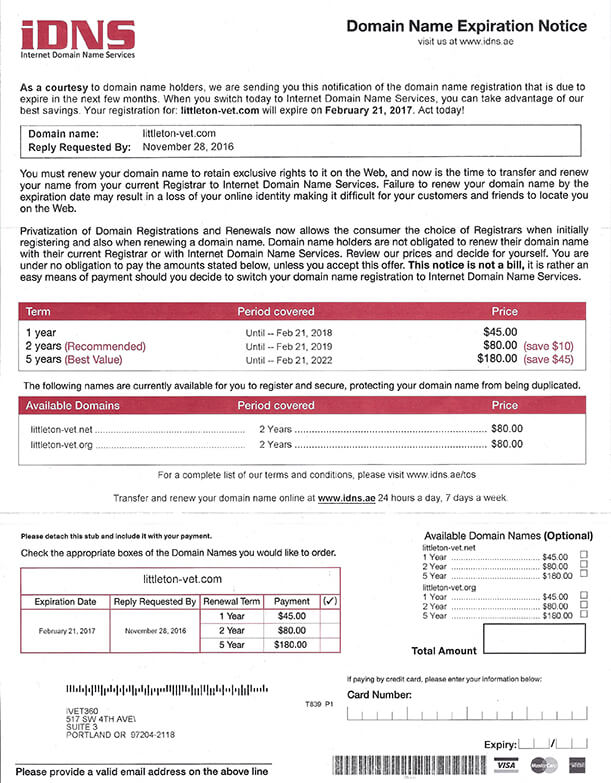
The classic version still arrives by mail: a letter styled like an invoice, from a company with a generic name built around words like “Domain Registry,” “Domain Services,” or “SEO Company,” warning that your domain is about to expire and your website will vanish from search engines unless you pay. The fee is typically several times what a real registrar charges, and if you pay it, you are not renewing anything. You are authorizing a transfer of your domain to them.
The email version is now far more common, and it is more dangerous because it can be interactive. Here are the variations we see hitting veterinary hospitals today:
Website and hosting invoices you don’t recognize. Invoices for “annual website listing” or “directory hosting” from companies you have never worked with. They are counting on your accounts payable process to pay first and ask questions later.
Fake expiration notices. An email that mimics your real registrar’s branding, warns that your domain expires in 24 or 48 hours, and links to a “renew now” page. The page is a phishing form built to capture your registrar login and card details.
“Search engine registration” notices. A letter or email claiming that your domain must be registered with search engines or its “SEO listing” will be canceled. There is no such thing. Google does not charge to index your website, and no third party can register you with it.
Trademark and brand protection alerts. An email, often from an overseas “registrar,” claiming another company is trying to register your hospital’s name under .cn, .asia, .net, or a dozen other extensions, and offering to block it if you buy those domains first. Nobody is trying to register anything. The sender just wants to sell you domains you do not need.
Unsolicited purchase offers and appraisals. Emails claiming your domain is worth thousands and offering a paid “appraisal” or brokerage service. These usually lead to a fee, not a sale.
Red Flags That Give the Scam Away
Most of these notices share the same tells. If you see two or more of these, stop and check before you do anything:
- Urgency and threats: “final notice,” “loss of domain,” “removal from all search engines,” and a deadline measured in hours or days.
- A sender name you do not recognize as your registrar, hosting company, or marketing partner.
- A price well above what a .com renewal actually costs (roughly $10 to $20 a year at most reputable registrars).
- Deliberately confusing language. One notice we received for a client warned that failure to respond would “result in the cancellation of this search engine optimization domain name notification proposal notice.” That sentence means nothing, and that is the point.
- Links that do not go to your registrar’s actual website. Hover before you click, or better yet, skip the link and log in to your registrar directly.
A request for payment by check or wire to a company you have never done business with.
How to Find Out Who Really Controls Your Domain
Here is where things have changed since we first published this article, and it is worth understanding because the old advice no longer works.
In 2016, we told readers to run a WHOIS lookup, which would show the owner’s name, the registrar, and the expiration date. Two things happened since then. First, privacy regulations like GDPR led registrars to redact owner names and contact details from public records by default. Second, ICANN officially retired the WHOIS protocol for generic domains in January 2025 and replaced it with a newer system called RDAP. You will still hear people say “WHOIS,” and some lookup sites still use the name, but the underlying data now comes from RDAP.
What that means for you: a public lookup will still tell you the important things, which are your registrar (the company you actually pay), your expiration date, your nameservers (where your DNS lives), and whether the domain is locked against transfer. It usually will not show your name anymore, and that is a good thing. The scammers used to harvest their mailing lists from that exact data.
To run a lookup, use ICANN’s official tool at lookup.icann.org and enter your domain. If the registrar listed there does not match the company that sent you a notice, the notice is not from your registrar.
If you have no idea who your registrar is, that is the first problem to solve. Search your email for “domain renewal” or “domain registration,” ask whoever built your website, or ask us. You should be able to answer the question “who do we pay for our domain, and when does it expire?” in under a minute.
Six Ways to Protect Your Domain and Your Wallet
- Know your registrar and keep the login in the practice’s hands. Your domain should be registered to the hospital, in an account the owner or practice manager can access, not in a former employee’s personal account and not solely in a vendor’s. If a marketing company or web developer registers your domain for you, confirm in writing that the hospital is the registrant and that you can get the login on request.
- Turn on two-factor authentication at your registrar. Most of today’s domain theft is not a mailed letter. It is someone phishing your registrar password and transferring the domain out. Two-factor authentication stops that cold, and every major registrar offers it for free.
- Confirm privacy protection is on. Most registrars now include WHOIS privacy at no charge and enable it by default, but older accounts sometimes still have it off or are still being charged for it. Check your account. If your registrar wants to charge extra for privacy in 2026, that alone is a reason to consider moving.
- Enable auto-renew and keep the payment method up to date. The single most common way a hospital actually loses its domain is not a scam. It is an expired credit card and a renewal email that went to an inbox nobody checks. Set auto-renew, register for multiple years if you can, and make sure the contact email on the account is a shared address someone monitors.
- Keep the registrar lock on. Registrars offer a “transfer lock” or “registrar lock” setting. Leave it on unless you are deliberately moving the domain. It prevents anyone from transferring your domain without first unlocking it in your account.
- Route every domain-related notice through one person. Tell your front desk and your bookkeeper: anything that mentions your domain, your website listing, or search engine registration goes to the practice manager (or to us) before anyone pays it. Ninety percent of these scams succeed because they land in an accounts payable pile.
Your Domain Is Also Your Email
One last thing the 2016 article did not cover: your domain does not just serve your website. It also decides whether the emails you send to clients land in the inbox or the spam folder, and whether someone else can send email pretending to be you. That is handled through DNS records called SPF, DKIM, and DMARC, and most veterinary hospitals have never set them up. We walk through all three in DMARC, SPF, and DKIM: Email Safety and What You Need to Know. If you control your domain, you control this too. If a scammer controls your domain, they control it instead.
You Should Never Have to Guess
For iVET360 clients, none of this is homework. We track registrar, expiration, and DNS for every hospital we work with; domain registration is included in our monthly rate, and we know within minutes when a “notice” is bogus because we already know your real registrar. Whether or not you work with us, someone should be looking out for your hospital online the same way. A domain costs less than a bag of prescription food per year. Losing it costs a great deal more.
Not sure who holds your domain, or want a second set of eyes on a notice you received? Reach out, and we will check it for you, no strings attached.